


Reader Alex sent me a link to this article, updated in July by Microsoft, about the danger of deletion for an unlicensed OneDrive account:
https://learn.microsoft.com/en-us/sharepoint/unlicensed-onedrive-accounts
I took a quick look at it while traveling and added it to the list of things I wanted to write about.
Yesterday, during the ILTACON session we were doing with Loop, I talked a bit about the upcoming change that I wrote about in the last edition of the newsletter:
A Small Change with a Big Governance Impact

If you haven’t seen this in the Message Center, you may want to be aware of it:
The change, of course, is that Copilot Pages will start being stored in OneDrive very soon, instead of being embedded in SharePoint, which seems like a good thing for eDiscovery practitioners but does create something to think about when applying various policies to OneDrive.
Someone came up to me afterward and asked how we're handling unlicensed OneDrive accounts going forward. Referencing the same change.
I don’t think it’s a coincidence. I think there is a lot of confusion about what is happening with unlicensed OneDrive accounts.
Let’s try to understand the issue.
According to the article above, the important factor is whether you deleted the user account or just removed the license. If you only removed the license:
Unlicensed OneDrive accounts linked to a user account that has not been deleted in Entra ID. These accounts are archived on their 93rd unlicensed day. If the account remains unlicensed and unlicensed account billing isn't enabled, it's subject to the cumulative 365-day nonpayment clock for deletion.
Versus deleting the account:
Once you delete the unlicensed account, both the OneDrive account and its files are moved to the recycle bin. After 93 days in the recycle bin, it will be permanently deleted, and the user is no longer able to sign in to their work or school account.
So this is pretty straightforward: if you delete the account, the 93-day recycle bin process starts. If you unlicense the account but leave it in Entra, OneDrive data is archived after 93 days.
The scary part about archiving is that the data is no longer available to be viewed. An Admin can’t assign rights to the OneDrive data; the only way to access it is through an eDiscovery collection.
That remains true even if the OneDrive account is on hold or subject to a retention policy. A hold would not stop the archiving process; it would stop deletion at 365 days, but the data would not be viewable until you created a billing account for unlicensed OneDrive storage or licensed the account again.
It would remain subject to eDiscovery, but that would be the only way to access it, and if it hits the retention date, it’s gone.
So, from a workflow perspective, we’re looking at how we offboard users. Do we delete them when they leave? Then, barring a hold or other retention policy, the data gets deleted 93 days later.
If we unlicense the account but leave it hanging around in Entra “just in case,” we need to know that without a billing account for unlicensed OneDrive storage, that data will be archived after 93 days, limiting our ability to access it.
If that’s been your practice, this chart should find its way into your brain:
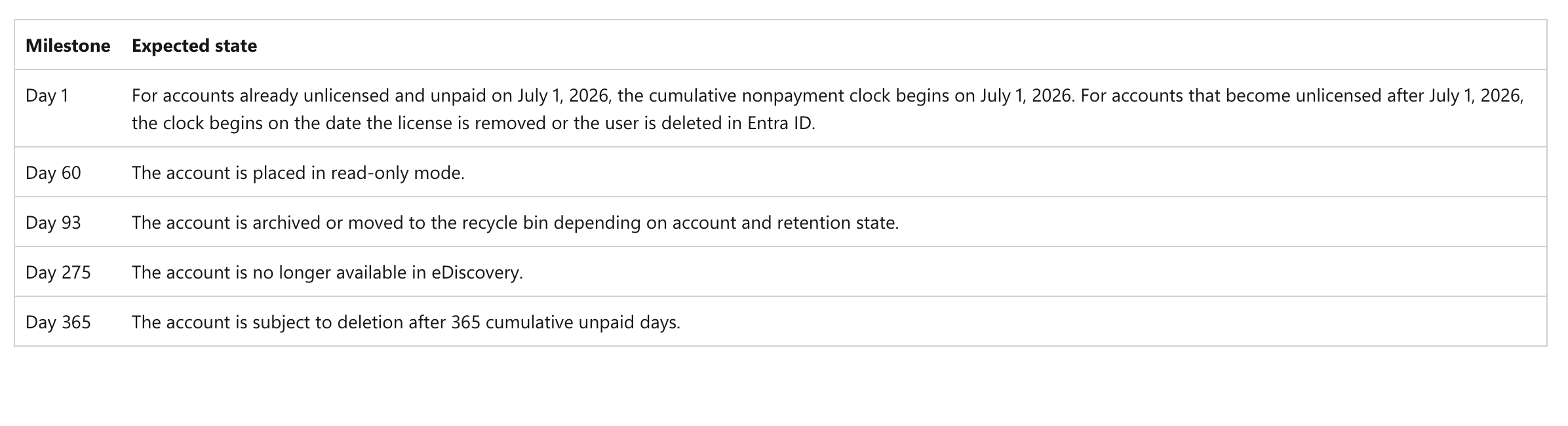
This also underscores the importance of placing holds or retention policies that make sense for your business. If you’ve got people using OneDrive often, is 93 days long enough to review and copy important data from an exiting user’s OneDrive? If it’s not, you may need to reconsider how you unlicense the account, copy the data to another location, or rely on an eDiscovery collection after crossing the 93-day threshold.
Like most things in the eDiscovery world, it’s all about knowing what’s coming and planning for it. Like most Microsoft-related things, it’s also about staying flexible when things change.
Most importantly, given the change to Copilot Page storage, before you make decisions about this process, do you understand everything being stored in OneDrive automatically? (Meeting notes, meeting recordings, uploaded files to Teams chat and Copilot chat, Copilot-created documents, etc.) It’s always important to understand what data you have before you start planning how to deal with it as part of compliance.
I am curious, though. How do you offboard users and handle OneDrive data?
My concern is less about the archiving process and lack of front end/Graph access given they are still viewable by Purview. This is the statement of concern: "If billing is not enabled for unlicensed OneDrive accounts, and accounts are still retained 365 days after becoming unlicensed, then the unlicensed accounts will be subject to deletion 365 days after being unlicensed even if retention policies, settings, or holds exist on the OneDrive account.". Billing is disabled on default, and the assumption is that holds / retentions are in force until released. This change requires organizations to enable billing proactively (assuming they are even paying attention), and start incurring the $.02/GB/Month charge - not an insignificant amount for many orgs. Finally, this raises the question, do we assume an eventual parity with SharePoint sites and even Exchange? Those charges could rack up.